Why the same webhook can run twice
Providers retry deliveries, so your receiver can see the same event more than once. Stripe says so in its docs and suggests logging the event ids you have already processed (Stripe: handle duplicate events). When your endpoint times out or returns an error, the provider sends the event again, and Stripe keeps retrying a live-mode delivery for up to three days with exponential backoff (Stripe: automatic retries). If nothing remembers that the event was already handled, the job behind it runs again: a second charge, a second order, a second CRM row. For a store, a webhook that runs twice can send two shipments or two vouchers for one order.
One stable key, claimed once
The fix is a key that stays the same across retries, claimed once. Each Stripe retry carries a new signature and timestamp, so the stripe-signature header cannot be the key. The event id can: the template uses evt: plus the body id, and when a body has no id it uses sha256: plus the SHA-256 of the raw body. The claim is one statement on a primary key, INSERT ... ON CONFLICT (key) DO NOTHING RETURNING key, so only one delivery gets the row back, even when two arrive at the same time. A returned row runs the business step. No row means the event was seen before: the receiver still answers 200, and the charge, order or CRM row is not created a second time. The order of the checks matters for security as well. Verify the provider signature first (Stripe: verify events), then claim the key, so a forged request cannot claim a real event id. The template does not verify signatures, so that check goes in front of it.
What happened when we ran it
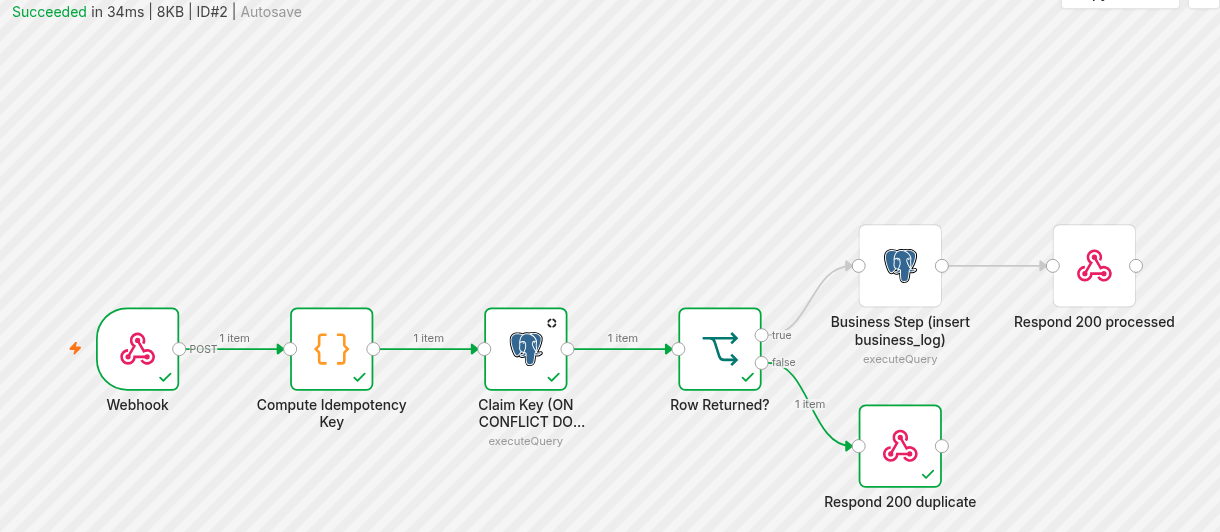
We ran the n8n template below against Postgres on our own machine, with n8n 2.42.6 and Postgres 16. We sent event A, then event A again with a different signature header, then event B. n8n recorded 3 executions and the business table got 2 rows. The repeat of A got a 200 response and did not run the business step, so the retry was answered and nothing was written twice. We then sent a body with no id twice: the key was the SHA-256 of the raw body, and the second call took the duplicate branch. In a separate check, we sent 8 concurrent claims for one key to Postgres with the SQL this page generates: one got the row back, and the business step ran once.
Putting it into n8n
Whoever runs n8n can import the workflow we exported after that run, with the lab credential id removed, point it at Postgres, and replace the business step with their own nodes. The Webhook node uses the response mode "Using Respond to Webhook node", so the branch that ran sends the answer. The Code node builds the key, a Postgres node runs the claim, and "Row Returned?" sends a new event to the business step and a repeat to "Respond 200 duplicate".
n8n workflow template (Webhook, Code, Postgres, IF, Respond to Webhook)
The exported workflow as a .json file, ready to import.
-
Create the tables
CREATE TABLE IF NOT EXISTS processed_events (
  key text PRIMARY KEY,
  first_seen timestamptz NOT NULL DEFAULT now()
);
-- Example business table used by the template. Replace it with your own step.
CREATE TABLE IF NOT EXISTS business_log (
  id bigserial PRIMARY KEY,
  event_key text NOT NULL,
  event_type text,
  created_at timestamptz NOT NULL DEFAULT now()
);
-
Set the environment and credentials
Self-hosted n8n blocks built-in modules in the Code node by default. Set
NODE_FUNCTION_ALLOW_BUILTIN=cryptoon the n8n container sorequire('crypto')works. After import, open both Postgres nodes and pick your Postgres credential (host, port, database, user, password). n8n can also save execution data, including the webhook body, depending on your execution settings. If the body holds personal data, review those settings and their retention. -
Import, connect your step, publish
In n8n, import the .json file. Replace "Business Step (insert business_log)" with your own nodes, keep them on the true branch of "Row Returned?", then publish the workflow. Put your signature check in front of the Code node if your provider signs requests.
-
Test with a repeat delivery
Send the same event twice and a different event once. In Executions you should see the first and third runs go through the business step, and the second run take "Respond 200 duplicate".
-
Clean up old keys
Cleanup is a separate step, not part of the webhook workflow. Keep keys longer than the provider can resend. Stripe allows a manual resend from the Dashboard for up to 15 days and from the CLI for up to 30 days (Stripe: manual retries). A scheduled n8n workflow or cron job can run:
DELETE FROM processed_events WHERE first_seen < now() - interval '30 days';
Limit: the key is claimed before the business step runs. If the business step fails after the claim, a retry of that event is treated as a duplicate. Add an error path that runs DELETE FROM processed_events WHERE key = $1 for that key, or fix and replay the event by hand.
What is stored, and what stays in your browser
The key on this page is computed with crypto.subtle.digest in your browser, and the page script makes no network request with what you paste. In Postgres, processed_events stores the key and a timestamp. The key is the provider event id, or a SHA-256 of the body when there is no id. The example business_log table stores the key and the event type, and your own business step decides what else is stored. The planner above generates the same claim as the n8n template: INSERT ... ON CONFLICT (key) DO NOTHING RETURNING key, a branch on the returned row, and a separate cleanup DELETE. These notes describe the code on this page and in the template. They are not a certification.